Free and open source · MIT
Coming fromConductor?
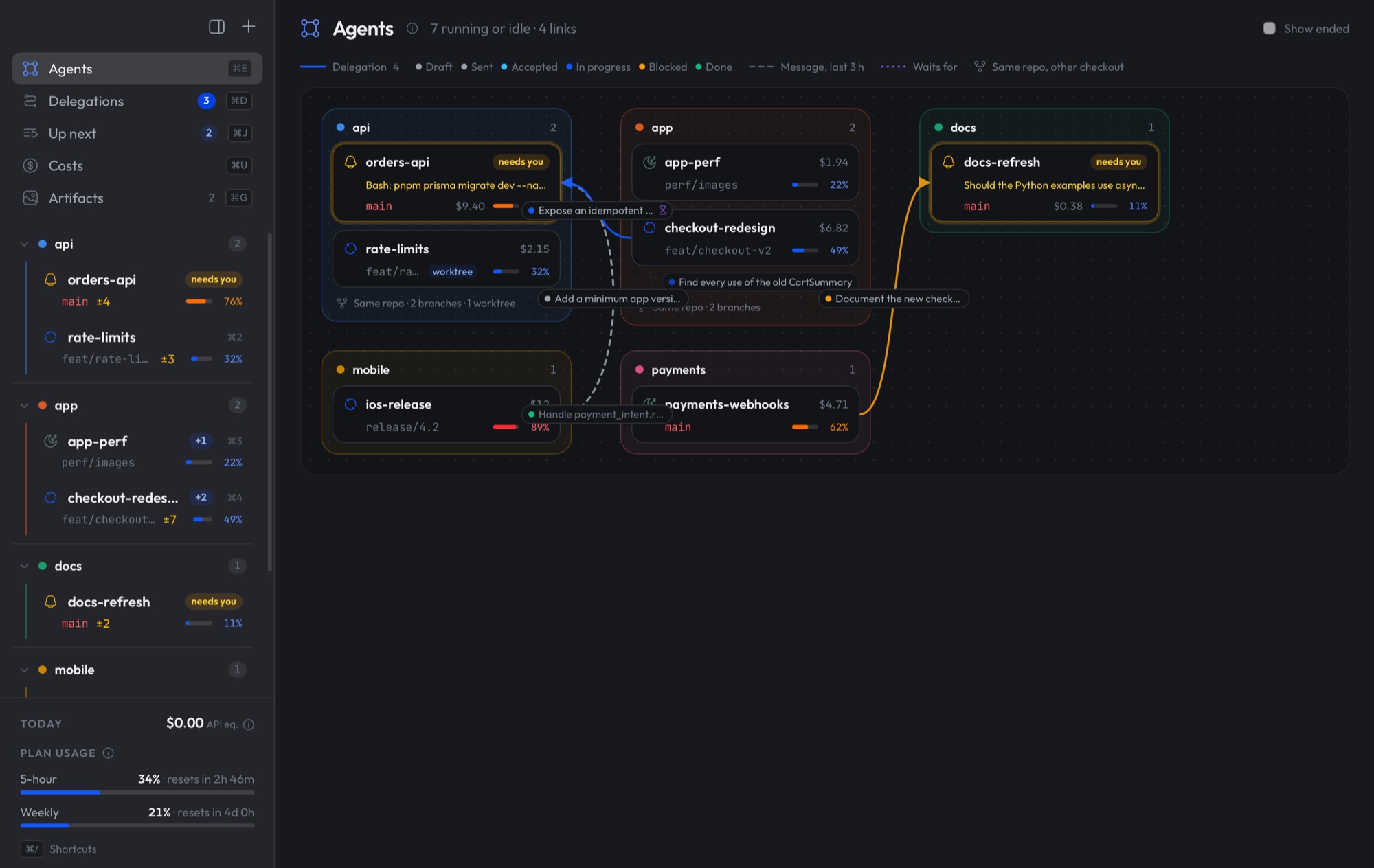
OpenAdmiral runs your Claude Code agents side by side, and Codex agents too, from an app for Mac and Windows. It's 100% local, with no account and no cloud, so there is nothing to shut down. Your Conductor scripts work as they are, and on a Mac your agents keep working with the lid closed.
brew install --cask openadmiral/tap/openadmiralmacOS 13 or later and Windows x64 · MIT licensed
First, thank you, Conductor
Conductor showed a lot of people what working with several coding agents at once can feel like, and it did it beautifully. Congratulations to the team on joining Meta.
From Conductor's announcement: Conductor Cloud workspaces go read-only on Friday, November 13, and Conductor begins deleting Cloud user data on Friday, November 20. Local Conductor keeps getting new models and critical bug fixes until early 2027, Pro features stay free for existing Pro users, and active Cloud subscribers get a refund. The team says it hopes to share something new early next year.
Using Conductor Cloud? Before November 20, bring your work home: right-click a cloud workspace and choose Transfer to local, or use Settings → Account → Export data.
Side by side
What you did in Conductor, in OpenAdmiral.
Your repos and branches are plain git, and Conductor's workspaces are ordinary git worktrees (under ~/conductor/workspaces). Open Claude Code in any of them with the plugin and it shows up.
| In Conductor | In OpenAdmiral |
|---|---|
| Several agents at once, side by side | Every Claude Code session in one window. The Agents view shows who is doing what as it happens, the chat splits into up to four panes, and any agent can float in a window of its own. |
| Your repos, in a sidebar | Projects: named, coloured cards in the sidebar that group your folders and agents. Drag them into the order you like. |
| A workspace per task | A worktree per agent, git's own word for it: New agent → In its own worktree starts it on a branch of its own in a separate checkout, on by default when another agent already works in that repo. Or Start from a branch, a pull request or an issue. |
| Setup, run and archive scripts | Read as they are: OpenAdmiral reads .conductor/settings.toml (or conductor.json) with the same CONDUCTOR_* variables, so a repo set up for Conductor works unchanged. Setup runs when a worktree is made; Run (⌃5) gives each run action a terminal and the worktree's own ten ports; Archive keeps uncommitted changes in a git ref and the branch. |
| Spotlight testing | Each worktree runs its own app from the Run tab, on its own ten ports ($CONDUCTOR_PORT to +9), with its preview a click away. You test an agent's work where it is, beside the others, with no syncing back and forth, and your main checkout is never touched. |
| Claude Code and Codex | Claude Code agents, and Codex agents too (first version): New agent → Codex when its CLI is installed, in the folder or a worktree of its own, picking up the same conversation after a restart. |
| Reviewing the diff, then a PR | Changes (⌃4): what an agent changed since its branch left the default branch, file by file, with notes on any line sent back to the agent as one message; Create PR has it commit, push and open the pull request. From 0.1.15, the pull request is there too: its status and review decision, CI checks with Fix (the end of a failed log goes to the agent), GitHub review comments inline with their replies, Update from the base branch, and Merge, which names any blocker before it goes. All through your own gh. |
| Knowing when an agent needs you | A macOS notification the moment one stops for a permission or a question, even with the app in the background, a count in the menu bar, and the ones waiting on you at the top of the sidebar. |
| Talking to each agent | The agent's own Claude Code terminal, right in the app, and its whole conversation, readable and searchable. |
| Lining up what comes next | Up next, all on your Mac: a prompt or slash command runs when the agent is free, after another agent delivers, or on a schedule (weekdays at 8:00, say), waking a closed session up if it has to. |
| Keeping an eye on usage | Costs: spend per project and per model, a month-end projection, and how much of your 5-hour and weekly plan is left. |
And then some
What you'll find here.
Close the lidMac
With Underway on, you can close the lid and your agents keep working; the Mac sleeps as usual once they're done. It stops by itself on low battery, if the Mac gets too hot or after a time limit, falls back to your iPhone's connection, and resumes agents a dropped network stopped.
Agents that work together
Your agents already talk to each other with Claude Code's own SendMessage. OpenAdmiral draws it: who is working for whom, and who is waiting for an answer.
Every result, kept
Reports, plans, diagrams, UI mocks and pages your agents publish are collected beside the work that made them, every version kept.
Native to Claude Code
A Claude Code plugin, through Claude Code's own extension system: your plugins, hooks, skills and MCP servers work as always. Remove it and everything is exactly as it was.
Get started
Two minutes to your bridge.
- 1
Add the plugin
In any Claude Code session:
/plugin marketplace add OpenAdmiral/openadmiral /plugin install openadmiral@openadmiralRun /reload-plugins in sessions that were already open.
In the VS Code extension, where /plugin isn't available:
Install in VS Code - 2
Install the app
On a Mac, download the latest .dmg (macOS 13 or later, Apple Silicon and Intel), open it and drag OpenAdmiral to Applications. On Windows x64, run the installer.
Download the .dmgOn Windows (x64): run the installer from Download for Windows. It isn't signed yet, so the first time Windows SmartScreen steps in: click More info, then Run anyway. It needs Claude Code installed; the plugin is the same two /plugin commands.
Or with Homebrew:
brew install --cask openadmiral/tap/openadmiralEvery session with the plugin shows up on its own. That's it.
Welcome aboard.
Questions about moving over? Write to support@openadmiral.com or open an issue on GitHub.