Skip to content

Early alpha · Free and open source

Command a fleet of AI agentsfrom a single bridge.

You stopped writing every line yourself. Now stop babysitting every terminal. OpenAdmiral is mission control for your Claude Code sessions: see them all, step in only when they need you, and let them work together.

macOS 13 or later · Apple Silicon and Intel · MIT licensed

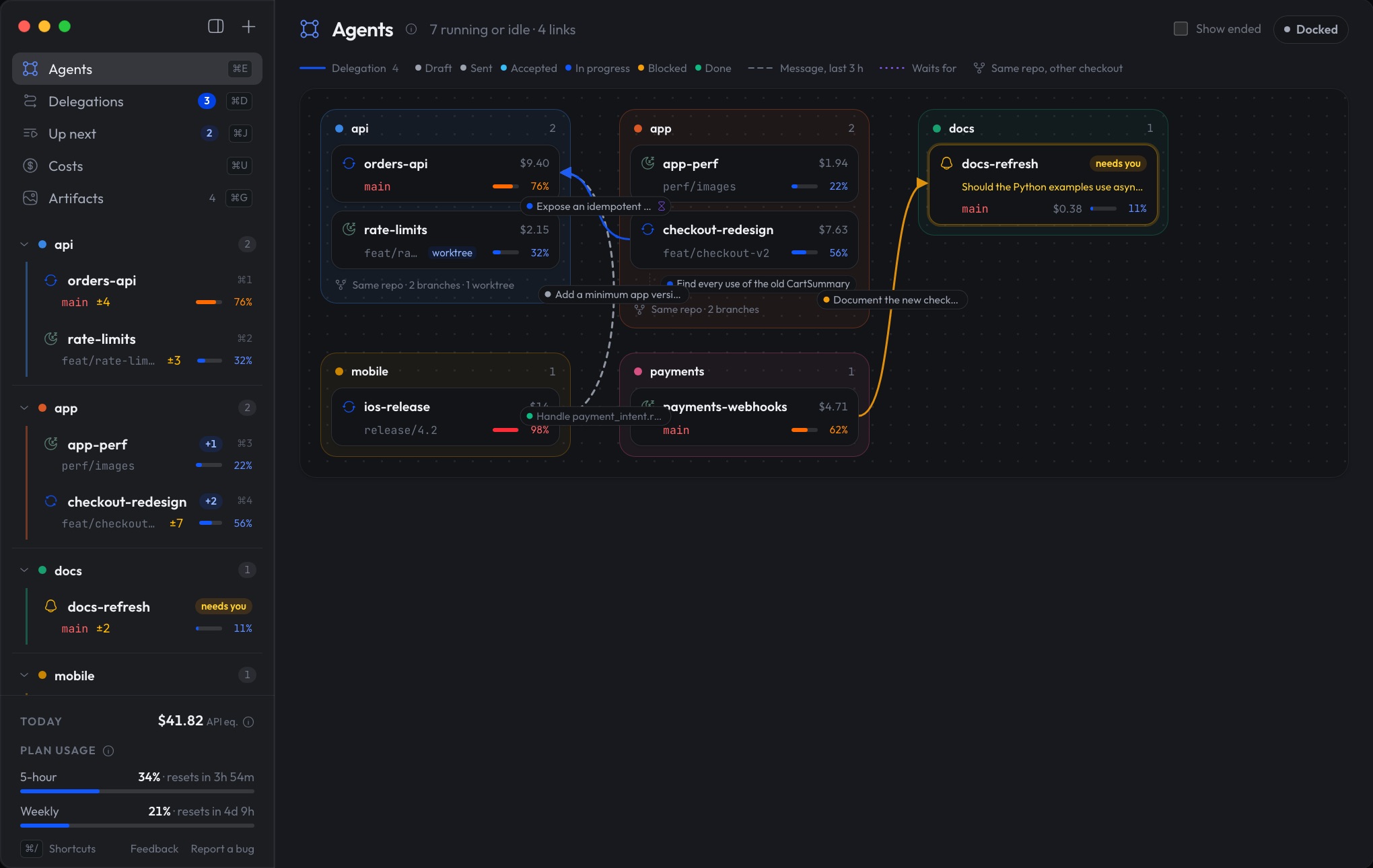
The OpenAdmiral app: every Claude Code agent on one map

00The problem, solved

More agents should mean more done. OpenAdmiral takes you out of the bottleneck.

  • You can't see your own fleet. Six terminals, six tabs, six scrollbacks.Every session on one map: who's working, who's done, who's stuck.
  • The agent that needs you waits in silence. It asked for a permission twenty minutes ago, behind a window you weren't looking at.A notification the moment it stops, and one click to answer.
  • Your agents can't talk to each other. The frontend needs an endpoint from the backend, so you become the messenger.Agents hand work to each other and report back on their own.
  • Work stops when you do. Step away from your desk and nothing moves.Line up the next step: it runs when the agent is free, when other work lands, or at 8 am. Close the lid and they keep going.
  • The results get buried. The report, diagram or plan you asked for scrolls away under thousands of lines.Every report, diagram and page is kept, rendered and versioned.
A single Claude Code terminal, the only thing in view

01See everything at a glance

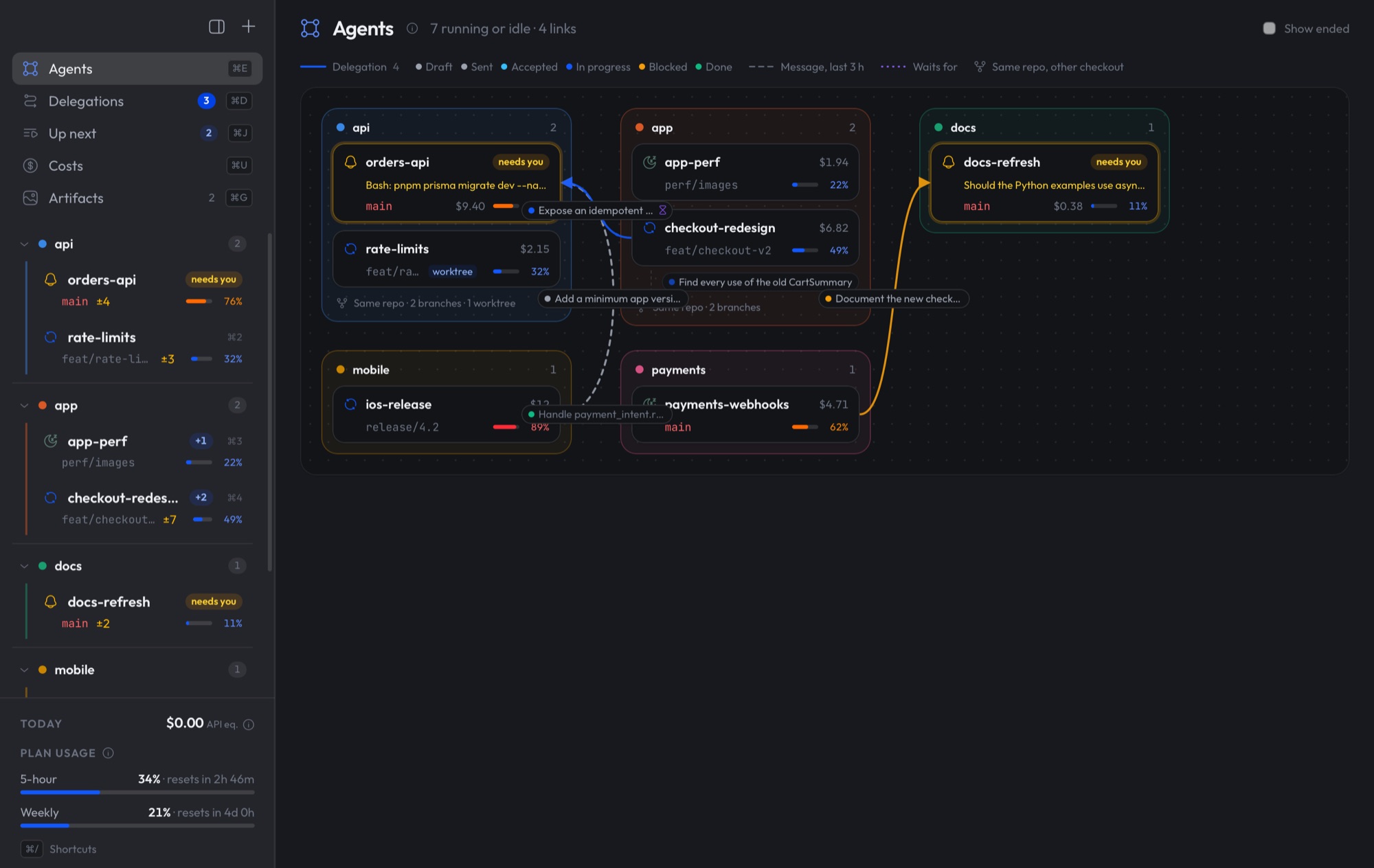
Your whole fleet, on one map.

Every Claude Code session from every project in one window: what it's working on, how far along it is, how much context it has left and what it costs. Sessions group by repo, and the ones that need you rise to the top.

  • Live status, branch and uncommitted changes
  • Context left and cost, per session
  • Who is handing work to whom, drawn as links

⌘E in the app

OpenAdmiral's agents map: every session grouped by repo, with delegations drawn between them

02Step in only when it matters

It taps you on the shoulder.

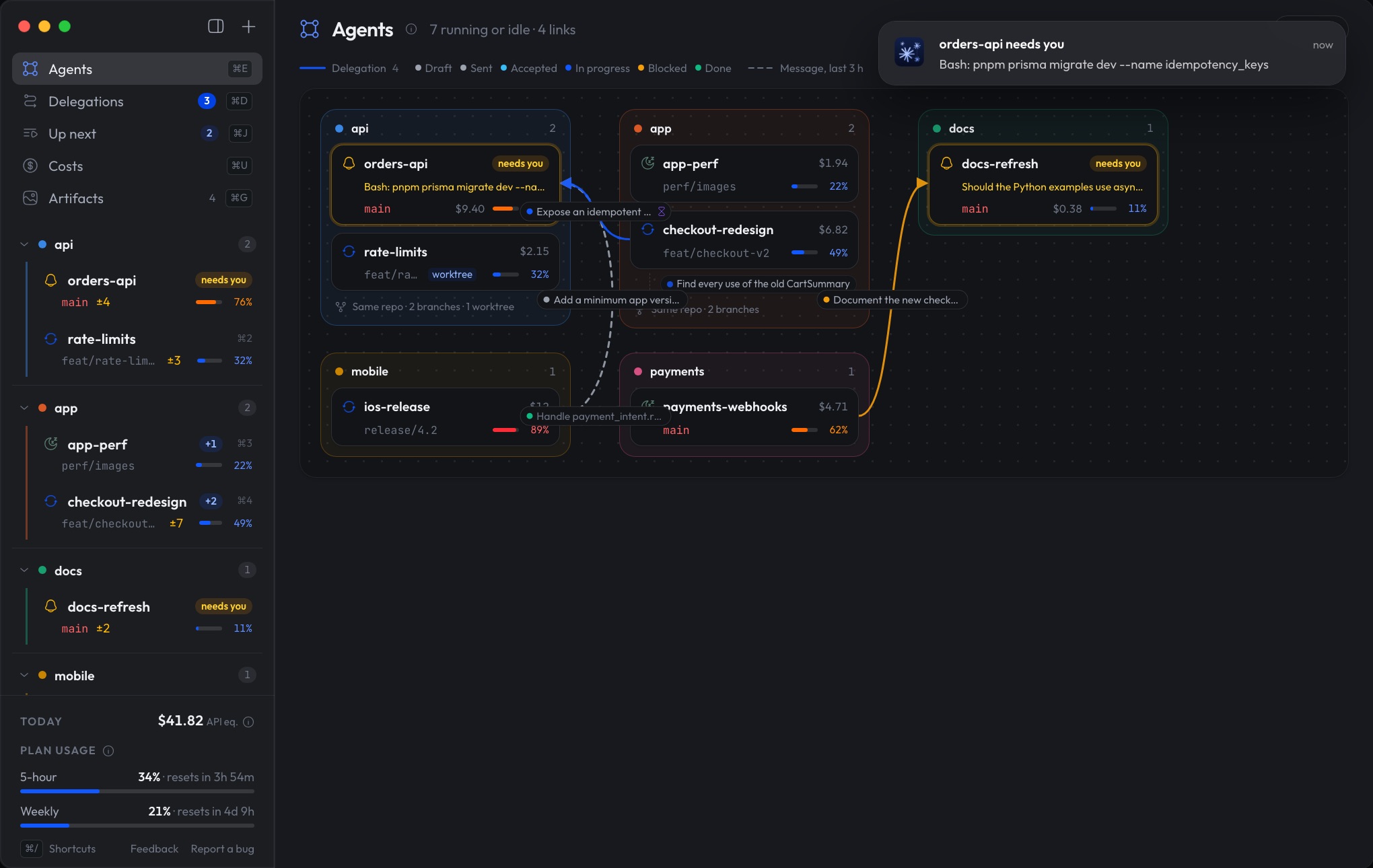
When an agent stops for a permission or a decision, you know the moment it happens, not twenty minutes later behind a tab you weren't watching. Click the notification and you're right there.

  • Native macOS notifications
  • Agents that need you jump to the top
  • Cycle through everyone waiting on you

⌘⌥⇧↓ in the app

A macOS notification: orders-api needs you, waiting for permission to run a migration

03Take the helm

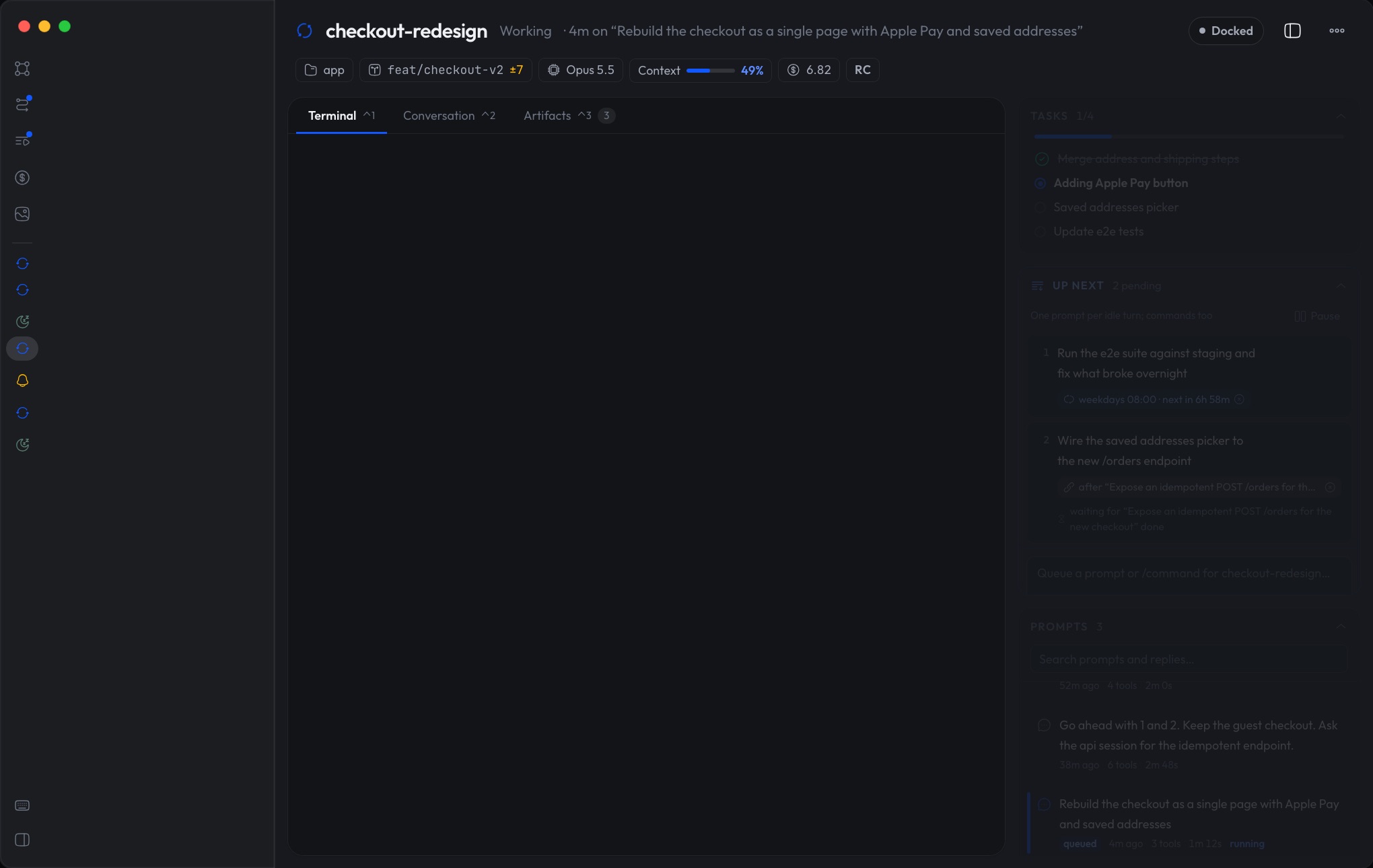
The real Claude Code. Right in the app.

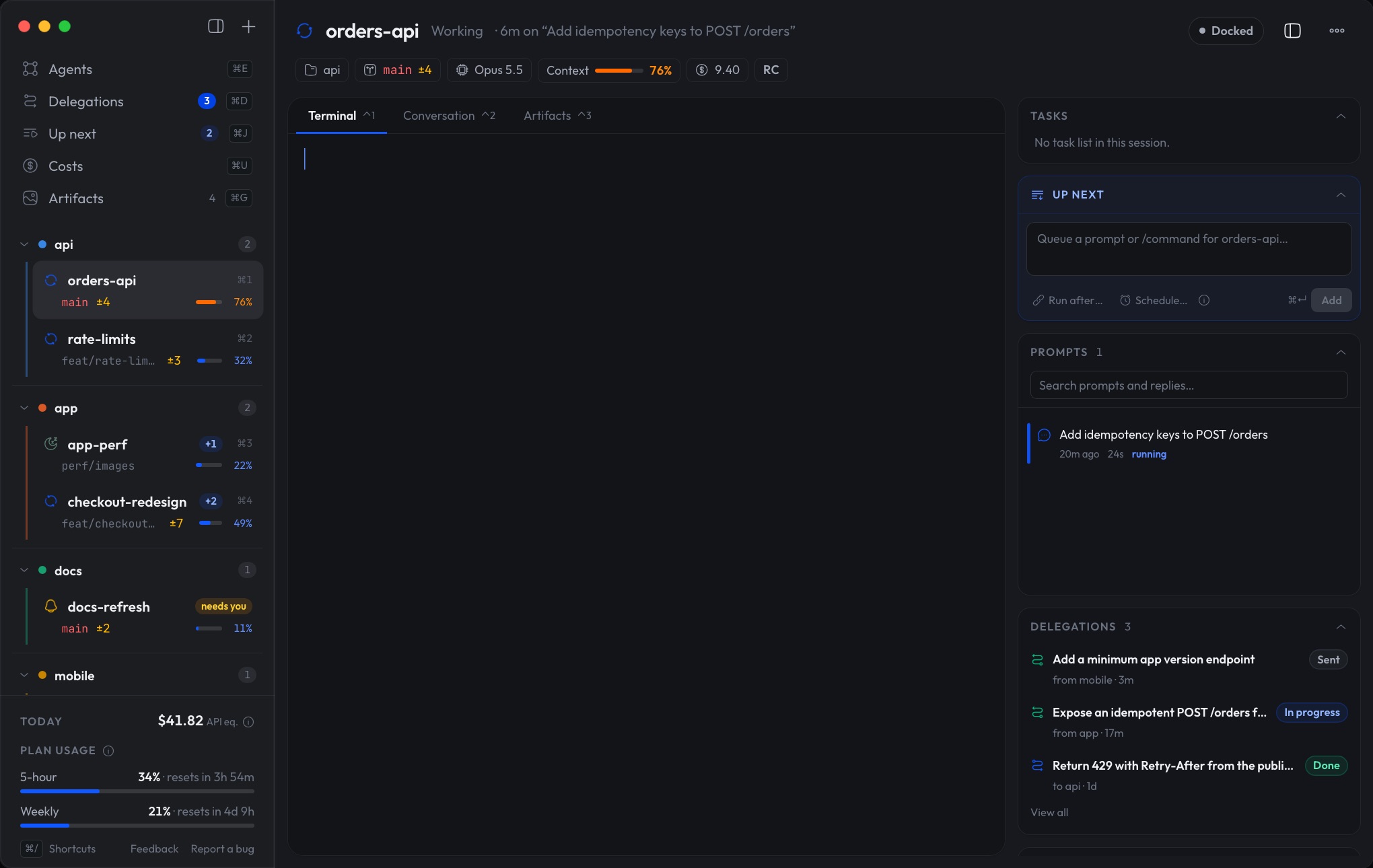
Open any agent and you're in its own terminal, inside OpenAdmiral. Not a wrapper, not a lookalike: the same Claude Code with your plugins, hooks, skills, MCP servers and shortcuts. Approve, answer, move on.

  • Attach to background sessions instantly
  • Every feature the day Claude Code ships it
  • Prefer your own terminal? That works too

⌃1 in the app

The orders-api agent's Claude Code terminal inside OpenAdmiral, running the migration

04Agents that work together

Stop being the messenger.

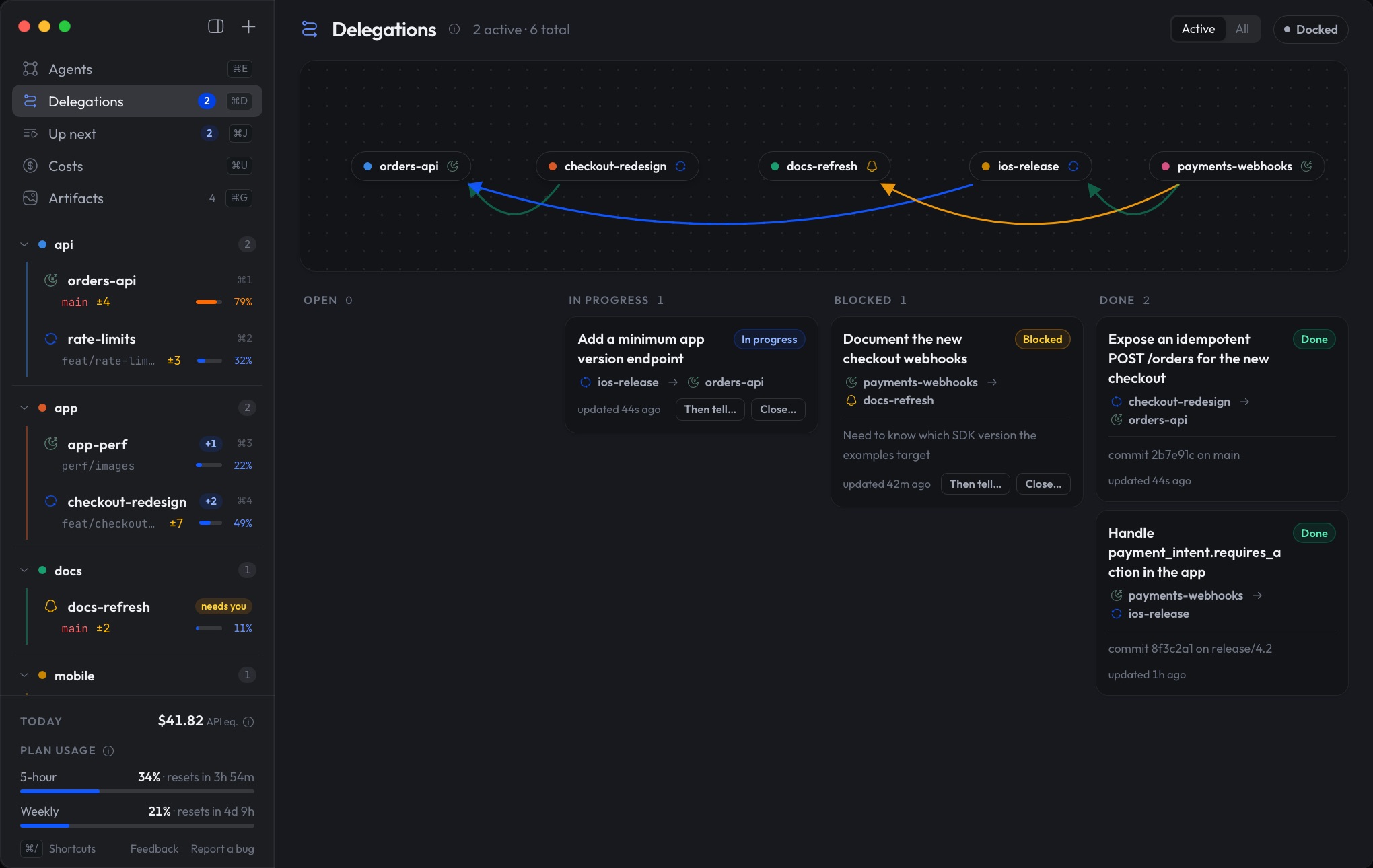
An agent can hand a piece of work to another with a clear brief, and that agent reports back as it goes: accepted, in progress, blocked, done. The checkout needs an endpoint? It asks the API agent. You watch the work flow instead of carrying it.

  • Delegations with status, notes and results
  • See what's blocked, and on whom
  • The sender hears back the moment work lands

⌘D in the app

Delegations between agents, from sent to done

05Work that keeps moving

Even when you're not looking, your agents keep working.

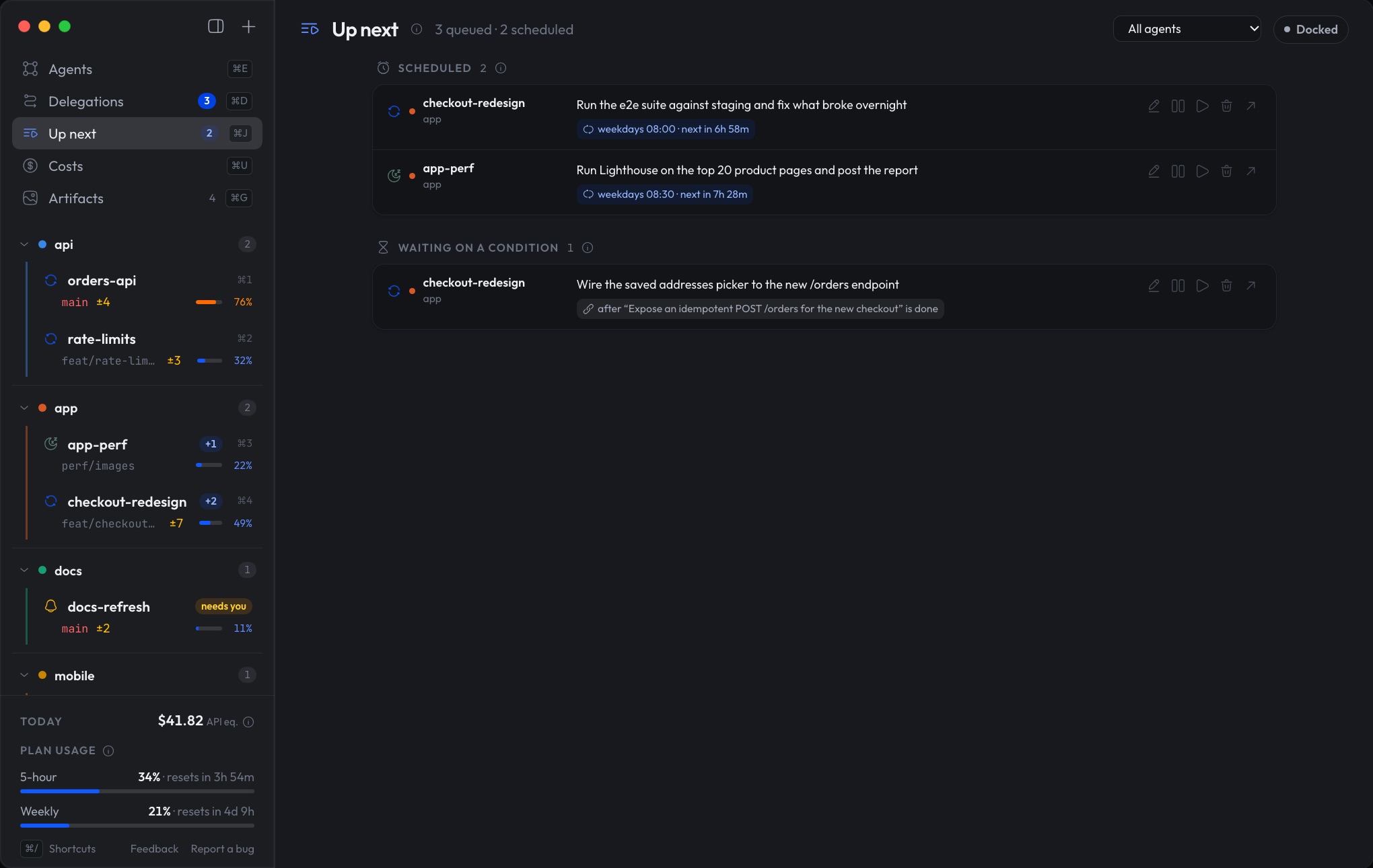
Line up what each agent should do next. A prompt runs when the agent is free, once another agent's work lands, or on a schedule, waking a closed session up if it has to.

  • Queue prompts and slash commands
  • Run once a delegation is done
  • Recurring schedules: weekdays at 08:00

⌘J in the app

Up next: scheduled and queued prompts across agents

06Close the lid

Close the lid. The fleet keeps sailing.

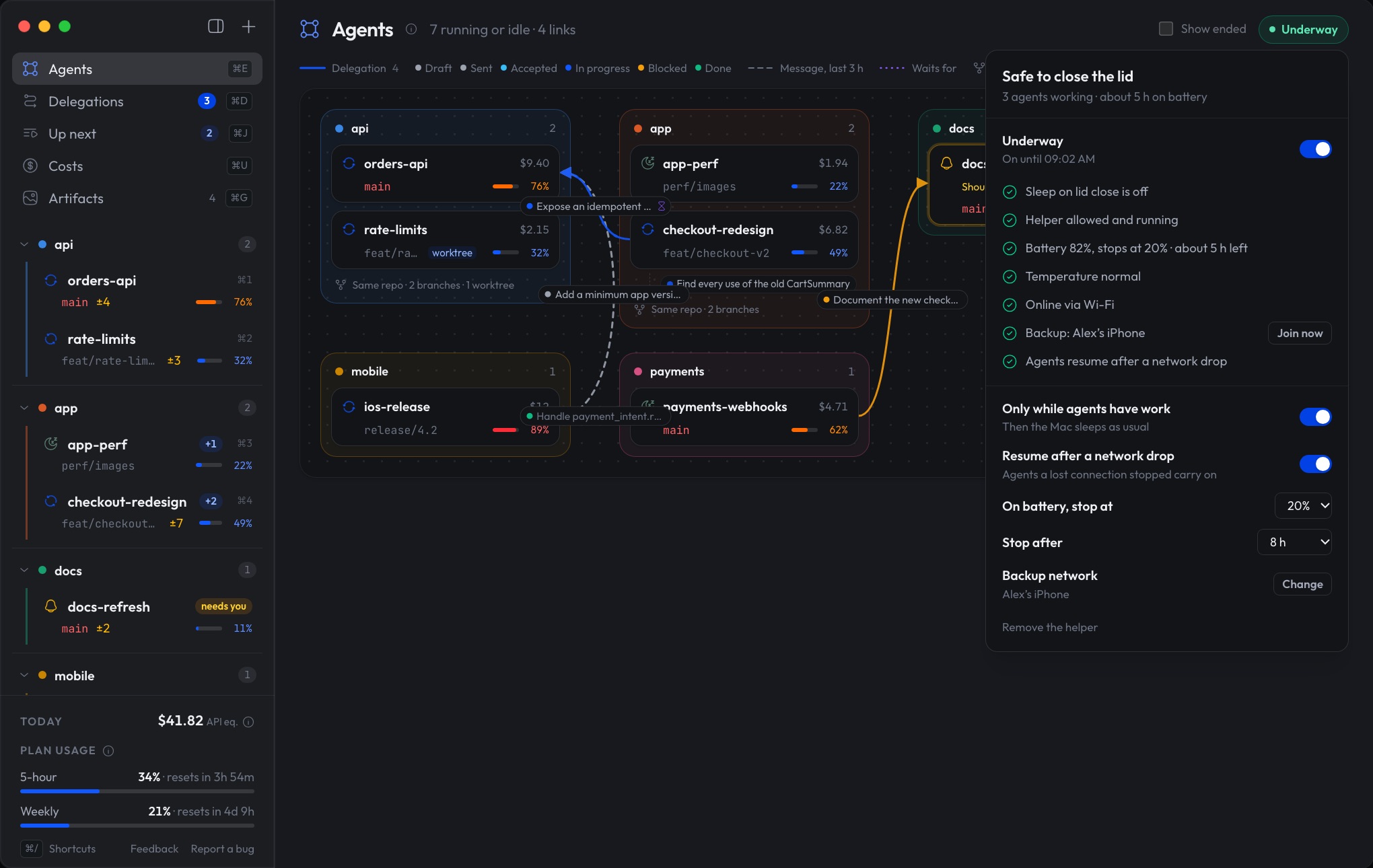
A Mac sleeps the moment its lid closes, and your agents stop with it. Turn on Underway and it stays awake for as long as they have work, then sleeps as usual. Before you pack up, the top right gives you one answer: Safe to close the lid.

  • Stops by itself: low battery, too hot, or a time limit
  • Agents a dropped connection stopped carry on once you're back online
  • Your iPhone as a backup network, by cable or hotspot
The Underway panel: safe to close the lid, with its battery, temperature, network, backup network and auto-resume checks

07Read the log

Go back in time through any conversation.

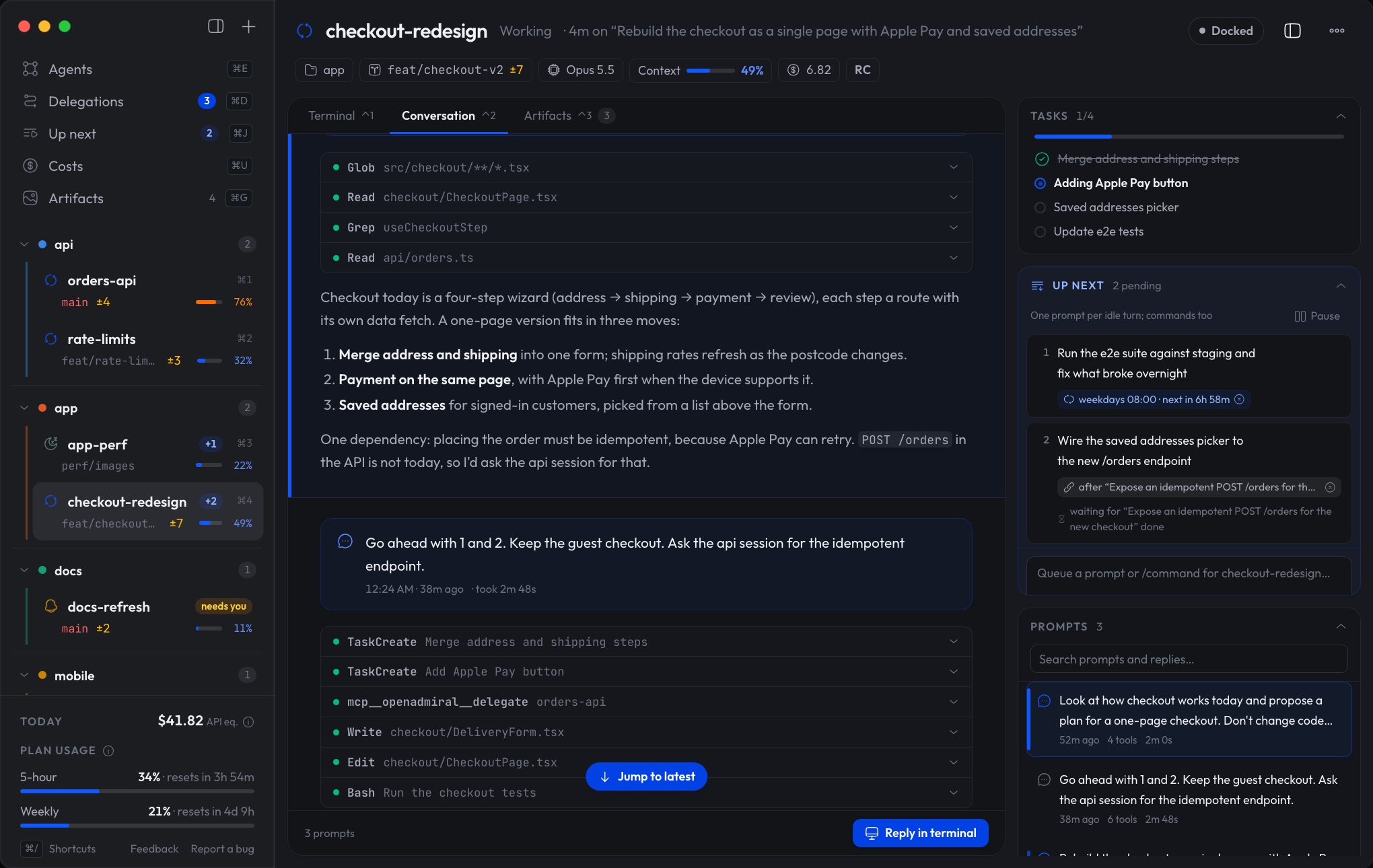
Each session's whole conversation, every prompt, tool call and reply, readable and searchable, even for the sessions you never attached to. Catch up in seconds on what an agent did while you were away.

  • Turn-by-turn index with tool calls
  • Search prompts and replies
  • Works for sessions running anywhere

⌃2 in the app

An agent's conversation: every prompt, tool call and reply

08Every result, in one place

See what your agents made, not a wall of text.

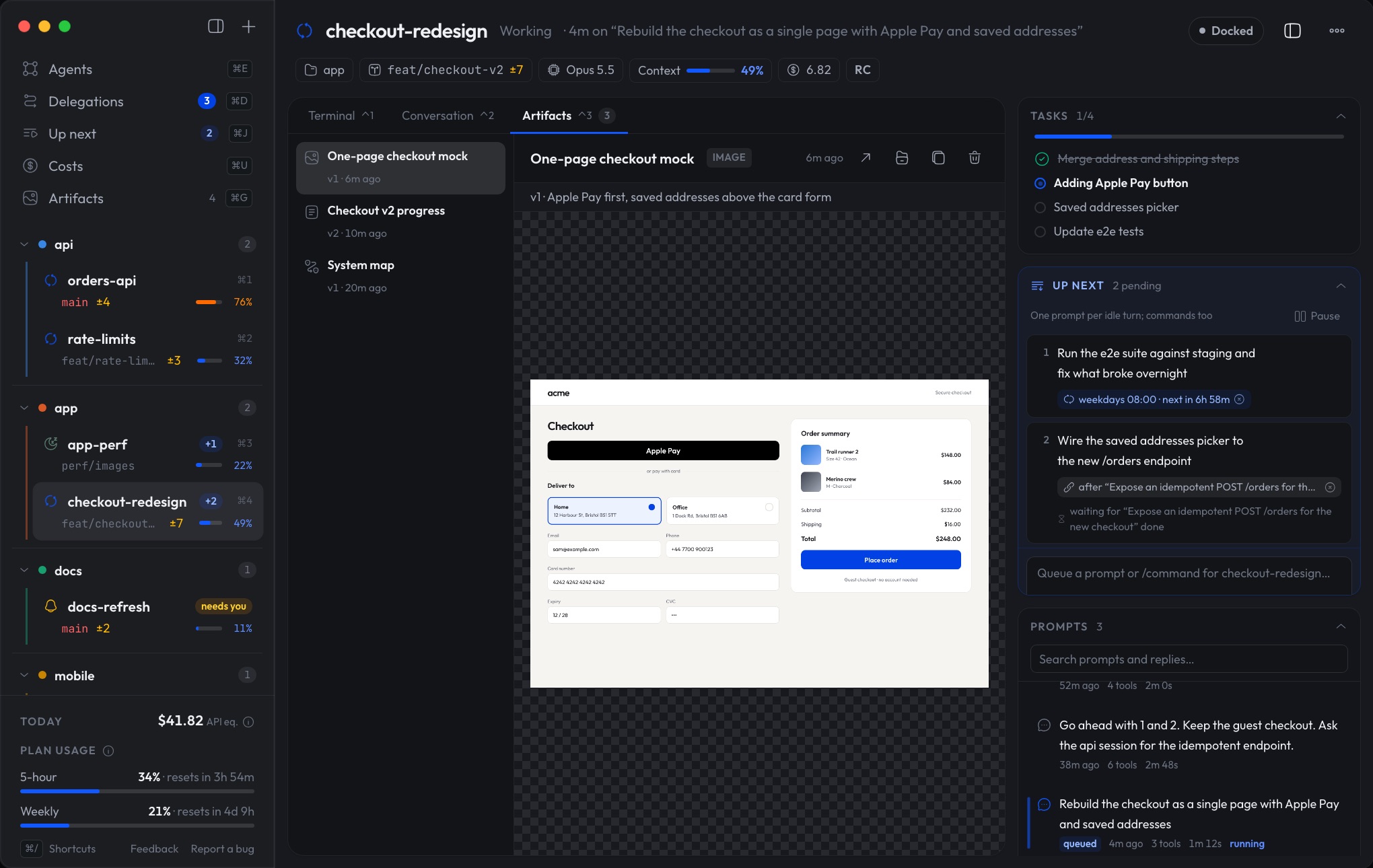
Reports, plans, diagrams and pages your agents produce are collected beside the work that made them, every version kept. No more hunting for the summary buried under ten thousand lines of output.

  • Reports, UI mocks, diagrams and live HTML pages
  • Every version kept, with notes
  • One gallery for the whole fleet

⌘G in the app

An artifact: the one-page checkout mock an agent published

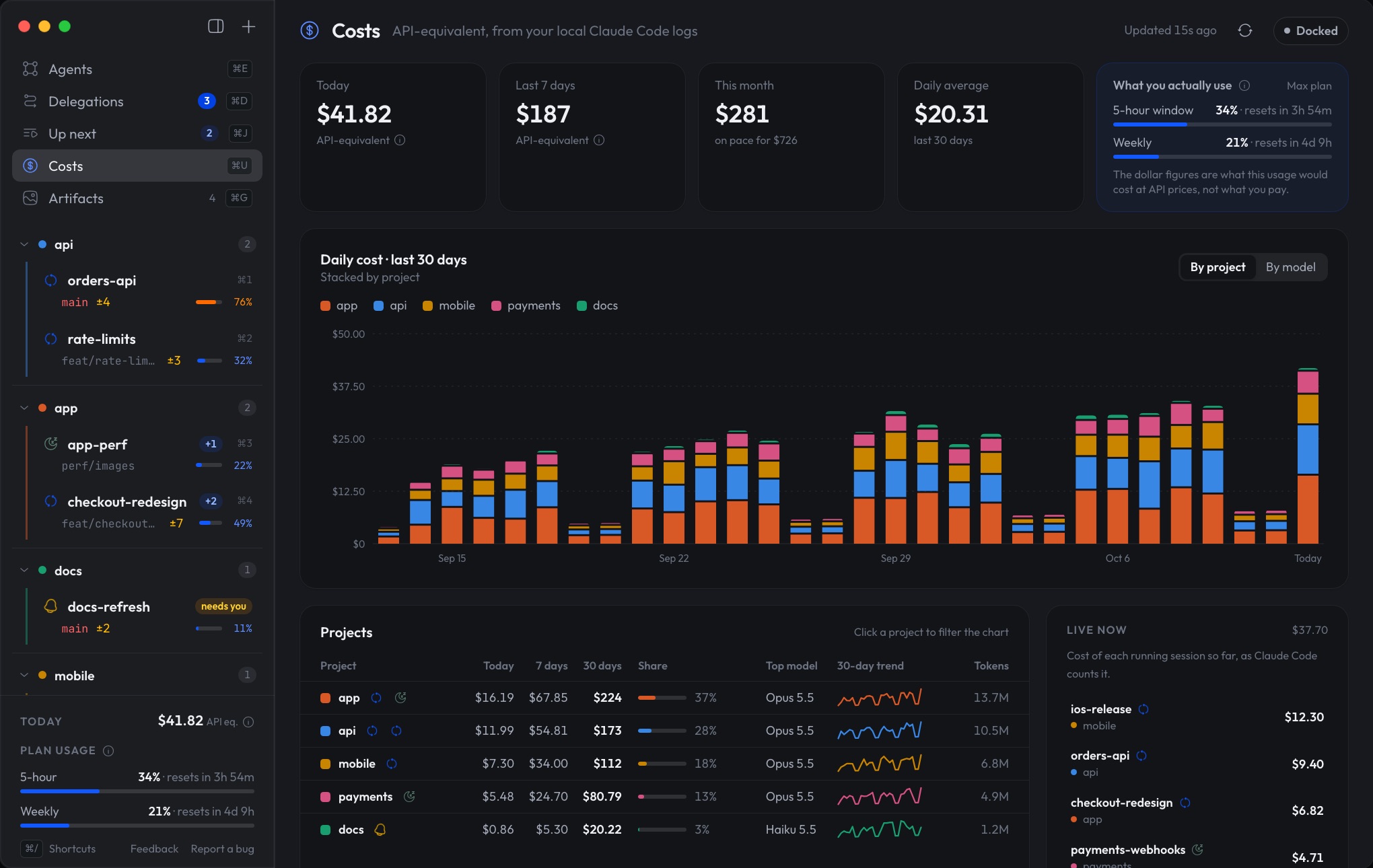
09No surprises on the bill

Keep a close eye on every cost.

What each project costs today and this month, which models it runs on, and how much of your plan is left before the limit, always in view.

  • Spend per project and per model
  • Month-end projection
  • 5-hour and weekly plan limits, with reset times

⌘U in the app

Costs: daily spend by project, plan usage and live sessions

Terminal power, desktop comfort

You don't have to choose.

Claude Code in the terminal is the most capable way to build with Claude. But a terminal shows one session at a time, in plain text, and only while you're looking. OpenAdmiral adds what a desktop app does well, without taking away anything the terminal does best.

>_

What you keep: the terminal

  • The real Claude Code, with every feature the day it ships
  • Your plugins, hooks, skills, MCP servers and settings
  • Your terminal, your editor, your shortcuts
  • Sessions that keep running in the background, with or without the app

What you gain: the app

  • Every session at a glance, and the ones that need you first
  • A notification the moment an agent is waiting on you
  • Reports, plans, diagrams and pages, ready to view
  • Every conversation readable and searchable
  • Agents that hand work to each other, queues and schedules
  • Agents that keep working with the lid closed
  • What it all costs, and how much of your plan is left

A day with OpenAdmiral

You set the course. Your agents do the work.

  1. 9:00

    Overnight, a scheduled prompt ran the end-to-end suite and an agent already fixed what broke. Two agents are working, one finished with a report waiting, one is asking a question.

  2. 9:05

    You answer the question. You ask the checkout agent for a one-page redesign; it sees it needs a new endpoint and hands that to the API agent.

  3. 9:10

    You line up its next step to run the moment the endpoint lands, and go to a meeting.

  4. 11:00

    The endpoint is merged, the checkout is half rebuilt, and the progress report is waiting in Artifacts. You didn't copy a single line between terminals.

  5. 18:00

    Two agents are still going. The top right says Safe to close the lid, so you close it and head home. They finish on the way.

Built on what you already use

Nothing stands between you and your sessions.

01

Your Claude Code, unchanged

No new agent, no wrapper, no other model. OpenAdmiral is a Claude Code plugin: no patching, no screen-scraping. Remove it and everything is exactly as it was.

02

100% local

Your code and sessions never leave your Mac: the app and your sessions talk through plain files in your Claude folder. No account. One anonymous daily ping counts installs, and you can turn it off.

03

Open source

MIT licensed. Read it, change it, make it yours. Ideas, issues and pull requests are welcome.

How it fits together
Claude Codeevery session, with the OpenAdmiral plugin
~/.claude/openadmiralplain JSON files on your Mac
OpenAdmiral.appthe bridge

Get started

Two minutes to your bridge.

  1. 1

    Add the plugin

    In any Claude Code session:

    /plugin marketplace add OpenAdmiral/openadmiral
    /plugin install openadmiral@openadmiral

    Run /reload-plugins in sessions that were already open.

    In the VS Code extension, where /plugin isn't available:

    Install in VS Code

    Or type /plugins, add OpenAdmiral/openadmiral in the Marketplaces tab, then install openadmiral from the Plugins tab.

  2. 2

    Install the app

    Download the latest .dmg (macOS 13 or later, Apple Silicon and Intel), open it and drag OpenAdmiral to Applications.

    Download the .dmg

    Or with Homebrew:

    brew install --cask openadmiral/tap/openadmiral

    Signed and notarized by Apple, so it opens like any other app.

  3. 3

    Open OpenAdmiral

    Every session with the plugin shows up on its own. That's it.

Or build it from source

Requires Rust, Node 20+ and pnpm.

git clone https://github.com/OpenAdmiral/openadmiral.git
cd openadmiral/app && pnpm install && scripts/install.sh

FAQ

Questions, answered.

What is OpenAdmiral?

A free, open source macOS app plus a Claude Code plugin. The plugin runs inside every Claude Code session and publishes its state; the app shows all your sessions in one window, notifies you when one needs you, embeds their terminals, and lets agents delegate work to each other, queue prompts and publish reports.

Does it replace Claude Code?

No. Your sessions are the real Claude Code, with every command, plugin, hook, skill and MCP server. OpenAdmiral plugs into Claude Code's own extension system and adds a desktop bridge on top.

Does my code or data leave my Mac?

No. Your code, prompts and sessions stay on your Mac: the app and your sessions talk through plain JSON files under ~/.claude/openadmiral, and there is no account. The app only sends one anonymous ping a day (a random install ID, the app version and your macOS version) so we can count installs, and you can turn it off. See openadmiral.com/privacy.

Do agents keep running when the app is closed?

Yes. Sessions run in the background with or without the app open, and scheduled prompts can wake a closed session up when they're due.

Do agents keep working with the lid closed?

Yes, with Underway on: the Mac stays awake while your agents have work, then sleeps as usual. It stops by itself below a battery floor (20% by default), if the Mac gets too hot, or after a time limit (8 h by default), and if OpenAdmiral quits, the Mac goes back to sleeping normally within 90 seconds. Keeping a Mac awake with the lid closed needs a small system helper: macOS asks you to allow it once, in System Settings → Login Items, and you can remove it from there.

Can I keep using my own terminal?

Yes. Keep working in your own terminal, or right inside OpenAdmiral. Both see the same sessions.

What do I need to run it?

A Mac with macOS 13 Ventura or later (Apple Silicon or Intel) and Claude Code. OpenAdmiral is free and MIT licensed.

Can I install it with Homebrew?

Yes: brew install --cask openadmiral/tap/openadmiral. It installs the same signed and notarized app as the download, and the app keeps updating itself.

How do I get help, or report a security issue?

Write to support@openadmiral.com, or open an issue on GitHub. Found a vulnerability? Please email security@openadmiral.com instead of opening a public issue (see openadmiral.com/.well-known/security.txt).

Is OpenAdmiral made by Anthropic?

No. OpenAdmiral is an independent open source project, not affiliated with or endorsed by Anthropic. Claude and Claude Code are trademarks of Anthropic.

How stable is it?

It's an early alpha: expect rough edges and frequent updates, which the app installs itself. Builds are signed and notarized by Apple.
Take command of your agent fleet.

Free, open source and 100% local. Your Claude Code, with a bridge.